How did the structure hold up?
One number. 0 is the floor, 10 is bullet-proof. Decimals count.
What the numbers mean
The problem: hard days stack up, and most of us only notice a bad stretch once we are deep in it. What this does: it counts your hard days from the number you already log, gives an early heads-up when a stretch has started, and shows how long you usually take to come back.
A day off by itself is a parked aircraft, not a repair — name the job, so your record can find out whether it works. Once the day has passed it is counted as held unless you say it didn't happen.
Rate first. Level second.
How fast damage is adding up (dD/dt) is the honest gauge — it needs no calibration.
30 days dD/dt
1 year dD/dt
D
The problem: one hard day is just a hard day. Three in a week is the start of a stretch — and from the inside it is easy to miss until you are two weeks in. What this does: it counts hard days for you and says so early, while one planned break can still cut the stretch short. The full explanation →
How it works — and what it assumes
The problem: the same day knocks you down week after week, and it feels like a personal failing instead of what it is — a repeating load. What this does: it shows the shape of your week, which day is the low point, and how far you fall from Friday to Monday. Then it lets you test whether a softer start changes it. The full explanation →
A positive number means Monday came in lower than the Friday before it. A negative one means Monday was the better day.
How it works — and what it assumes
In aircraft work the ground-air-ground cycle (GAG for short) is the swing from sitting on the ground, to flying, to sitting on the ground again. It is often the most wearing cycle an airframe sees, because it runs through the whole load range once per flight. A week can do the same thing to a person: one big cycle, with Monday as the landing load.
The bars are your average W on each day of the week, over the window you pick. The darkest bar is your low point — whichever day that turns out to be.
The Monday drop is last Friday's W minus Monday's, for every week you logged both.
On the founder's record (2,494 nights): Mon 5.41 · Tue 5.74 · Wed 6.03 · Thu 6.22 · Fri 6.57 · Sat 6.49 · Sun 6.01. Monday was lower than Friday in every year from 2020 to 2026; across 355 weeks the average drop was 1.16 points, and 60% of weeks had one.
What it assumes. That your week runs Monday to Friday. If yours doesn't, read the bars and ignore the Monday drop. And an average is a pattern, not a cause: the gauge can show that Mondays run low, not why. The soft-Monday test is how you find out whether changing Monday changes anything.
The problem: inside a dip it feels like it will never end, and afterwards you can't tell whether the break you took actually helped. What this does: it times every dip in your record, so you know your usual time back — and it marks the dips where you held a planned break, so you can see whether those came back faster. The full explanation →
How it works — and what it assumes
A dip starts on the first hard day after a day that was not hard. Recovery time after a hard stretch (Return to service) is the number of days until W is back at your typical value (the middle value of your record, unless you set your own under Data). A dip that runs into a day you did not log is left out, so a gap can never make the number look better. Dips longer than 60 days are left out too.
The median is the middle dip: half came back faster, half slower. The average sits higher because a few long dips pull it up.
On the founder's record: 273 dips could be timed. Half were back within 3 days; the average was 4.1; 19% took a week or more.
The miss, carried honestly. Time off alone did not shorten recovery in that record. Dips with a trip, vacation or day-off note within three days came back in 3.7 days on average, against 4.2 without — too small a difference to trust. Dips that ran into a weekend took longer (4.8 days against 3.8), most likely because the Monday after is the low point of the week. A day off is a parked aircraft, not a repair. That is why a planned break (depot block) asks for a named job — and why this gauge marks the dips that got one.
What it assumes. That “hard” means W at or below your hard-day setting and “back” means your typical W — both are settings, picked from one record. That a planned break (depot block) was held once its day has passed, unless you said it didn't happen. And the with / without comparison is an association in your own record, not proof that the break caused the faster return.
Declared mission mix — intent vs the spectrum you actually flew
Real life is rarely one mission. Allocate your declared season across the eight spectra (sliders normalize to 100%) and this compares it against the spectrum your last 90 days actually read — and how your material flies the blend. A lens, not a verdict: the fatigue math still reads only what you logged.

Read it like a loads engineer: every life flies a mission profile. This is a playful crossover, not a verdict — the gauges above are the instrument.
Dots are daily W, January through December. In a single year, the line is your chosen trailing moving average; in All years, every entry in the record lands at its day-of-year and the line runs through each month's mean across all years — the seasons, if you have them, will show.
Everything above measures wear. This measures the structure — how fast you come back after a knock, the level you come back to, and how hard the table is being shaken. Three readings, never combined into one. What this is →
Each point reads the 180 days centred on it, so the line lags real change by about three months. Read the shape, not the day.
Survey by mission
What this measures
Think of a marble in a bowl. Something knocks it up the side; the bowl pulls it back down. Your score does the same thing every day.
Bounce-back time (Ring-down) is how steep the bowl is. Short means you come back fast. It is not the same as feeling good — a steep bowl can sit at a low level.
Where your days settle (Set point) is where the bottom of the bowl sits: the level you return to, whatever today happened to be.
Daily swing (Daily jolt) is how hard the table is being shaken. A small jolt is not automatically better — quiet is a small jolt, braced is a big jolt with a short bounce-back time (ring-down).
The second analogy is aircraft stability: a fast return to level is a design choice, and it is not free. Fighters are built less stable on purpose, to respond quickly — and they need a control system running to stay flyable. The full explanation, with both analogies: Bounce-back check (Modal Survey) →
It did not see the stroke coming. Run across the founder's record against the worst event in it, the bounce-back time (ring-down) was improving right up to that morning. This is a condition check, not an early-warning alarm — and it is one person's evidence so far.
What is the spending for?
D counts what a life costs. A mission names what it buys. Spending is not failure — it is the only way to fly.
Amber bands are declared missions laid under the D(t) curve; the number on each band matches the history below. Every mission flown stays reviewable here — and review is the point: sometimes the hangar was exactly the right call, and the log should say so without apology. Unlabeled stretches are simply time without a declared mission — an observation, not a deficiency.
ⓘ What this measures — and what it cannot see
What it measures. For each mission window: ΔD — the fraction of calibrated life deposited while that mission was flying — its duration, and the average pace. In ASIP terms, defining the mission is a Task I analog (𝑖 SIP i5.1.2) — design information: deciding what the airframe is for before anything is measured against it — and the log itself is individual usage tracking: actual spectrum flown, logged against the declared mission. Stated flatly, because that is all the instrument knows.
What it cannot see. Whether the spending bought anything — that is what the daily mission entry adds, and even then only behaviorally. It cannot separate chosen spending from weather: illness, loss, and circumstance accrue damage on every airframe, and a mission window contains everything that happened inside it. And a contented flatline is indistinguishable from a depressed one in the fatigue math — the engagement axis exists partly for that reason.
The honest math. ΔD = Σ n/N over cycles closing inside the window, exactly the pipeline the Trends tab has always run: 4-point rainflow (ASTM E1049-85), residue as half-cycles, then a mean-stress correction S_eff = Sₐ + α·Sₘ. One honest label note: that linear form is closer to a modified-Goodman-type correction than to canonical multiplicative Walker, though this app has always labeled it "Walker." The math is unchanged; the label deviation is documented here rather than hidden. Miner's rule is sequence-blind — the same days in any order sum to the same D.
Status. Experimental. Default constants are calibrated to a single reference subject pending study data; calibrate to your own anchor to make the scale yours. Missions are annotations you control — created, edited, and backdated freely, because the record spans years before this tab existed.
Dates — backdate, or log a mission already flown
Leave these alone and the mission simply starts today and flies until you end it. Set a start date to backdate; set an end date only when logging a past mission into the history. You are annotating your own record — the record is older than this tab, and that is fine.
Optional. Mark a stretch when you were flying this mission the way you meant to — the damage rate you actually logged across it becomes this mission's pace target, and the pacer appears on the current mission. Your own record is the only pace source this instrument will ever use.
One mission at a time; gaps between missions are allowed and never counted against you — ground time is preparation for engagement.
You are the bright dot; the faint trail is the mission's days — daily points from the very first chip, thinning to weekly averages as the record grows. Across: whether the days built the mission or ran against it (the −1 / 0 / +1 entries above, averaged over the trailing 28 days). Up: how fast the last 30 days spent life, measured only against your own chronic pace — no one else's. Pick a past mission above and the trail replays that mission instead. No quadrant is red and none is green, because no quadrant is a verdict.
ⓘ Reading the map — and its limits
The four positions. Flying the mission hard — expensive and legitimate; the spending has a name. Efficient cruise — the mission moves at below your chronic pace; material well-matched to mission. In the hangar — low spend, low engagement. Rest, or drift? Only the pilot knows which — and sometimes the hangar is exactly right: depot maintenance, preparing the airframe for its next engagement, is a scheduled part of every service life. Paying without flying — damage accruing while the declared mission sits. This is the one pattern the instrument exists to flag, and it gets the gentlest read on the map, not the loudest: an airframe accumulating damage on no mission needs its mission re-examined — and possibly some deliberate ground time. That is maintenance language, not judgment.
What it cannot see. Not all damage is spending. Illness, loss, and weather accrue on every airframe — a hard season in "paying without flying" may simply be weather, never a misspent life. The engagement axis is deliberately behavioral ("did you build it?"), not affective ("did it feel aligned?") — feelings would echo the wellness dial and make the map circular. It still cannot see effort that moved nothing visible, or missions too private to declare.
If the hangar doesn't feel like rest. This instrument cannot see a crisis, and it will never try to diagnose one from dots and trails. If the hangar feels less like ground time and more like a hole, the right instrument is a person: in the US, call or text 988, any time.
Quiet rules. This tab never prompts you while the trailing 14-day mean W is below 4.0 — when the days are heavy, silence is kinder than arithmetic. Check-ins skipped are never re-asked in the same week. The map itself is always here when you come to it.
The honest math. x = the trailing 28-day mean of your daily −1 / 0 / +1 mission entries (one entry is enough for a point — the mean simply firms up as entries stack; midline at 0; clipped at the mission's start so no mission is colored by the one before it). y = 30-day dD/dt divided by your chronic pace (365-day when the record has one; whole-record pace before that), on a log scale clamped to ¼×–4×. Both axes are self-referenced by construction: this map has no norms, no other people, and no absolute scale. Experimental status: this is a personal instrument being tested on a reference record of one.
What actually works on you?
The Daily measures the damage. The bay keeps the maintenance record: which recovery procedures earn their place in your record — and which well-meant ones read as maintenance-induced damage.
Read it top to bottom: the Brief is the answer · hunch tests (coupon tests) are the experiments you are running · the scheduled read is when the answer refreshes · the working lists are your curated manual · name what helped (tag a repair) and add a candidate are the only two inputs · service history is everything you ever tried.
Three capped lists: Works for you (Certified) (works in your record — 3 slots), Doesn't work for you (Grounded) (well-meant maintenance that reads negative — 3 slots), Still testing (In Test) (candidates — 5 slots). A full list always asks who gets displaced; displaced items keep their record in the archive below. The Brief above can read the lists (curated) or the whole record (unvetted association — a rescue practice inherits the hard days it was deployed on).
Everything here says associated with, in your record — never causes, never proves, never will.
The filter. Everything here answers one question: can I put it on a calendar? Yes → it is a repair procedure and it belongs in the bay. No → it is an instrument reading, and it stays in the Daily exactly as it is today.
The lists, in plain words. Works for you (Certified) = it earned its slot: dose stated, interval stated, positive read, survived a hunch test (coupon test). Doesn't work for you (Grounded) = you did it to recover and your record reads it negative — maintenance-induced damage. Still testing (In Test) = candidates waiting on evidence. The caps (3 · 3 · 5) are deliberate: a manual with forty procedures is a manual nobody opens. Disposition (i5.3.8) just means your recorded decision on a finding — certify, ground, or drop — and none of it is permanent: any item can go back to Still testing (In Test) or to the archive at any time.
The gate. A procedure must carry a dose and an interval or it cannot be certified. "Water" is not a procedure. "16 oz before noon, daily" is. If you can't state the dose, it stays on Candidates — an automatic rule, so there's no judgment call at the moment of temptation.
The engine (i5.5.3). It scores days by the residual — the part of a day the bounce-back time (ring-down) model did not already predict from yesterday. "Expected" means: what yesterday alone would predict. Beating it reads GOOD; falling under it reads BAD — higher W than momentum explains is the whole test. Controls are matched from the same era of your record, so a hard year can't put a procedure on trial. Windows checked: same-day, +1 day, +3 days, and the week after; the winner is named in plain words. Verdicts wait for 5 occurrences; the Still testing (In Test) list runs a false-discovery correction; effects print in W units and damage-units per year, never a correlation coefficient.
The interval gate (i5.2.10). Results recompute only when the inspection interval comes due — the same date the Trends panel shows. Watching a gauge continuously couples you to the gauge; that hazard has a task number, and this gate is how the bay respects it. Early reads exist, warn plainly, and are logged.
Hunch tests (Coupon tests) (i5.2.13). Declared before the run — label, dose, direction, window, and the falsifier in your own words. At close the bay reports the pre-declared comparison and nothing else. Adherence is exception-based: the declared schedule is the record; tap an ON day you skipped, or an OFF day you did the practice anyway (v4.3.2), ideally within the week. Both are set aside at close — never swapped to the other side — and adherence prints beside the verdict. Findings are dispositioned (i5.3.8), procedures accumulate per label into the 𝑖SRM (i5.5.10), and the schema change is on record (i5.5.4). No new task numbers anywhere in this build — the program stays at fifty-five.
Same name, different seasons. Same-named studies pool into one all-time read — and Detail keeps the by-period breakdown underneath (practice stretches split on 90-day gaps, each judged against its own era). When two periods' intervals don't overlap, the verdict says periods disagree: the pooled number is an average of different things, possibly seasonal. Renaming onto an existing name always asks — merge (all-time pooling) or keep separate as "#2" — never silently.
What this bay is not. It cannot see a crisis and never diagnoses one. Anything prescribed — medication, a clinician's protocol — is a finding for a clinician, never dispositioned here: [Rx] entries live in the archive, and in the whole-record Brief they print as a set-aside line, number visible, never ranked.
The full story, with pictures. Open the Repair Bay feature page → — the two-logbooks idea, the engine, hunch tests (coupon tests), and the eight 𝑖SIP tasks this bay executes. And the data-economy map → — every input this instrument takes and every product it feeds, each box a link.
If what turns up here involves persistent depression, crisis, or harm, that finding routes outside this program — to a person. In the US: 988, by call or text. Anything prescribed is a clinician's call; this bay records it as a finding and goes no further.
The month, read like a service log.
Save as PDF opens your device's print sheet — choose "Save as PDF". The report is built from this device's record only.
It lives here. Nowhere else.
Everything stays on this device — which makes the backup file yours to keep. Export one monthly. See the map of what feeds this instrument — and what it feeds →
Filled days are straight-line estimates between real neighbors, tagged [auto-filled] in their note so they are always identifiable — and removable above. Short fills (≤7 days) barely touch the math: a straight line has no reversals, so it deposits no cycles. Filling longer gaps merges analysis segments and can change D — that is why the default cap is 3. Prefer the truth? Every missing date listed here can be entered by hand from the Today tab's date field.
Bring history in from a journal, spreadsheet, or the Workbook. CSV format: date,W,note — one day per line, date as YYYY-MM-DD, W from 0–10 (halves count), note optional. A header line is fine; it's skipped.
A date,W,note CSV — paste it straight into the Application Workbook's Data Entry sheet or the web tool.
Your filled 𝑖SIP Companion Workbook, your Mission Card, and your Mission Declaration — kept on this device so the placards are one tap away while you log. PDF or HTML. Nothing is uploaded anywhere; these files never leave the phone.
Honest limit: these files live in this browser's storage, not in the JSON backup — a workbook PDF would bloat every backup you take. Keep the originals where you made them, and re-import here after a device change.
The 𝑖SIP program map Mission Declaration — the instrumentAn optional once-a-day reminder — only if the day isn't logged by your chosen hour. A crew chief's knock, not a streak: one line, no escalation, never twice in a day. Honest limits: it fires reliably while the app is open; in the background it is best-effort, and only on platforms that allow installed apps to check in. No data leaves the device.
Downloads a small calendar file (.ics) — open it and your phone or PC calendar takes over, ringing at your tap hour every evening even when this app is closed. Honest limit: the calendar can't see your record, so it reminds you on logged days too. Change the hour above, tap again for a fresh file. Nothing leaves the device.
Every tab, the Repair Bay and its hunch tests (coupon tests), the math in a minute, the maintenance loop, backup & restore — twenty-four pages, plainly told. Questions: isightlaboratories@gmail.com
Open the User's Guide ▶ Watch the walkthrough — 3:15 ▶ Watch the 30-second spotModel parameters — advanced
Where these defaults come from: A — the life scale — was calibrated on the founder's thirteen-year, 2,400-day record (D = 1.0 at its documented anchor event); m, α, S_th, and the 7-day gap are standard fatigue-analysis conventions from the same reference pipeline. They are honest starting points, not your calibration. Once your record holds enough closed cycles — and ideally a documented anchor event of your own — set the anchor date and Calibrate, or type custom values directly, to make the scale yours.
The record & method behind the defaults The framework — a life in damage unitsUntil you calibrate to an anchor — a documented event of your own — the D level is on an arbitrary scale and only the rates mean anything. That is the honest default. Pipeline: 4-point rainflow (ASTM E1049-85) → Walker → S-N → Miner, identical to the web tool. One label note, documented in v2.0: the "Walker" step is the linear form S_eff = Sₐ + α·Sₘ — closer to a modified-Goodman-type correction than canonical multiplicative Walker. The historical label is kept and the math is unchanged; honesty about the name costs nothing.
Maintenance loop — settings
Defaults: a hard day is W 4 or below; 3 hard days in 5 trips the Hard-day count (Over-G counter); it then stays quiet until 14 days have passed without another 3-in-5 (one rough patch, one heads-up); a dip is over when W is back at your record's median; the back-in-service gauge waits for 30 logged days. These were picked by looking at one record — the founder's — so treat them as starting settings to re-test, not proven settings for you. They ride in your backup.
Where the nightly number feeds the 𝑖SIP program
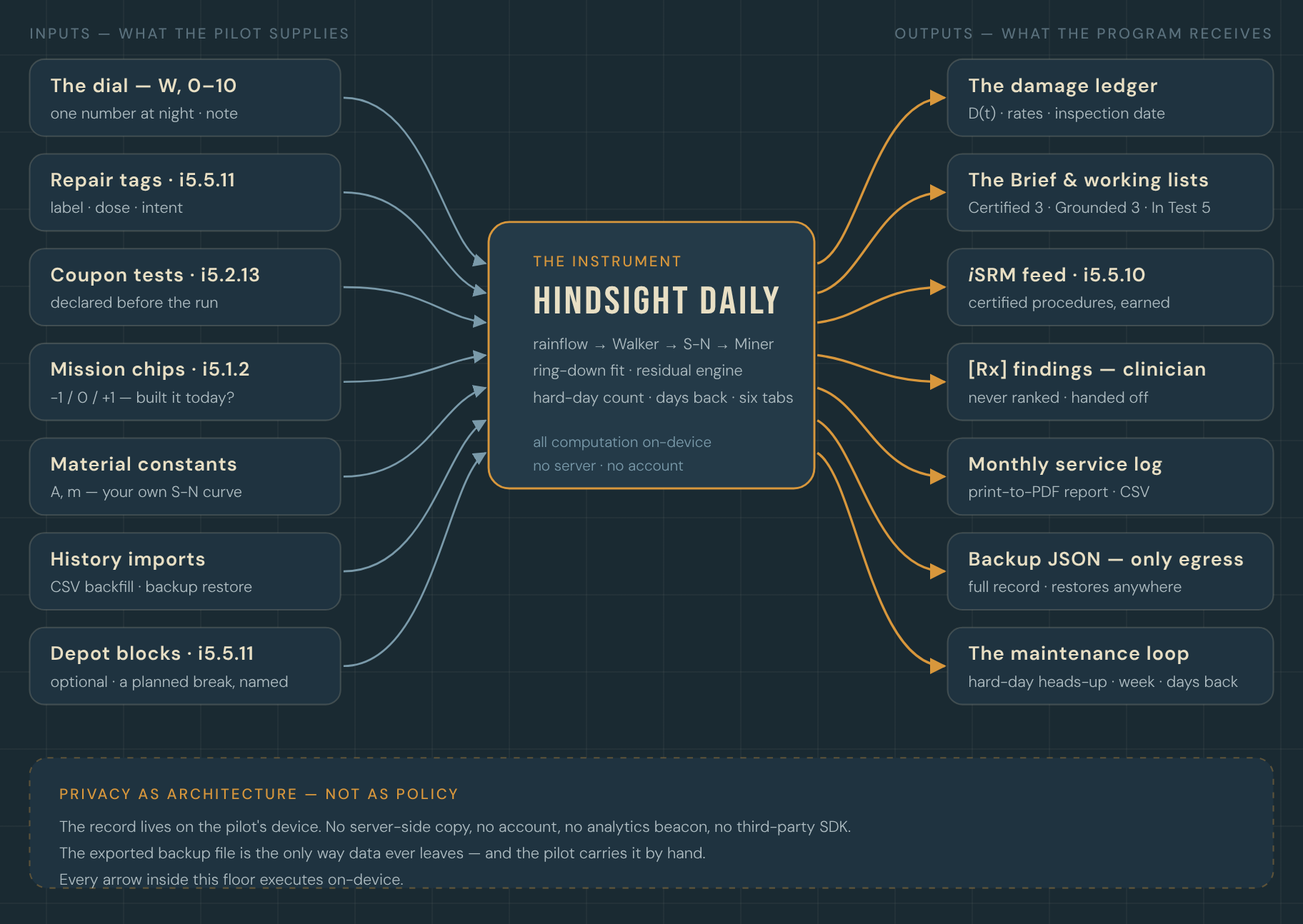
Hindsight 80/20 · iSight Laboratories · the Hangar · ·
Questions: isightlaboratories@gmail.com
▶ Watch the 30-second spot